

GitHub Events Discord Bot
A free, production-ready GitHub webhook bot that delivers clean, structured Discord embeds for repository activity in real-time.
Perfect for development teams, communities, and FiveM projects that want instant visibility on commits, pull requests, releases, and more.
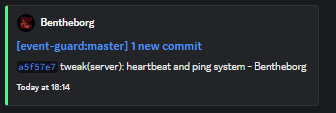
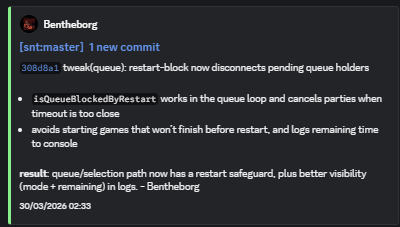
Works with commit descriptions unlike default GitHub Discord integration!
Key Features
Real-Time GitHub Event Tracking
- Instant Discord notifications for GitHub activity
- Supports push, pull requests, releases, issues, and more
- Works with both repository and organization webhooks
- Reliable delivery with GitHub retry support
Clean & Readable Discord Embeds
- Professionally formatted embeds for all events
- Automatic handling of large payloads (commit splitting)
- Clear commit summaries, authors, and changes
- Designed for readability in active Discord servers
Secure Webhook Handling
- Full signature verification using GitHub secrets
- Protection against invalid or spoofed requests
- Optional alert system for failed validation attempts
- Strict User-Agent validation
Developer-Friendly Architecture
- Written in TypeScript with full type safety
- Dynamic event handler system via
events/folder - Easily extend or customize event outputs
- Clean and modular codebase for quick modifications
Flexible Deployment
- Supports both HTTP and HTTPS setups
- Works locally with tunneling tools (ngrok / Cloudflare Tunnel)
- Simple environment-based configuration
- Lightweight and efficient runtime
Supported Events
- Push, Pull Requests, Releases
- Issues, Comments, Labels
- Deployments & Status Updates
- Repository & Organization Events
- And many more
Getting Started
- Download or clone the GitHub repository
- Install dependencies using
npm install - Configure your
.envfile (Discord token, webhook secret, channel ID) - Run the bot using
npm run devornpm start - Add your webhook URL in GitHub repository settings
GitHub Repository
View Full Source Code & Documentation
Why Use This?
- More customisation over default basic GitHub Discord webhooks
- Stay updated on development without checking GitHub
- Improve team communication and transparency
- Perfect for FiveM servers and dev communities
- Completely free and open-source
Support
If you need help, feel free to open an issue on GitHub or join the Discord (if provided).
Price: Free